
Multi-Agent Collaboration
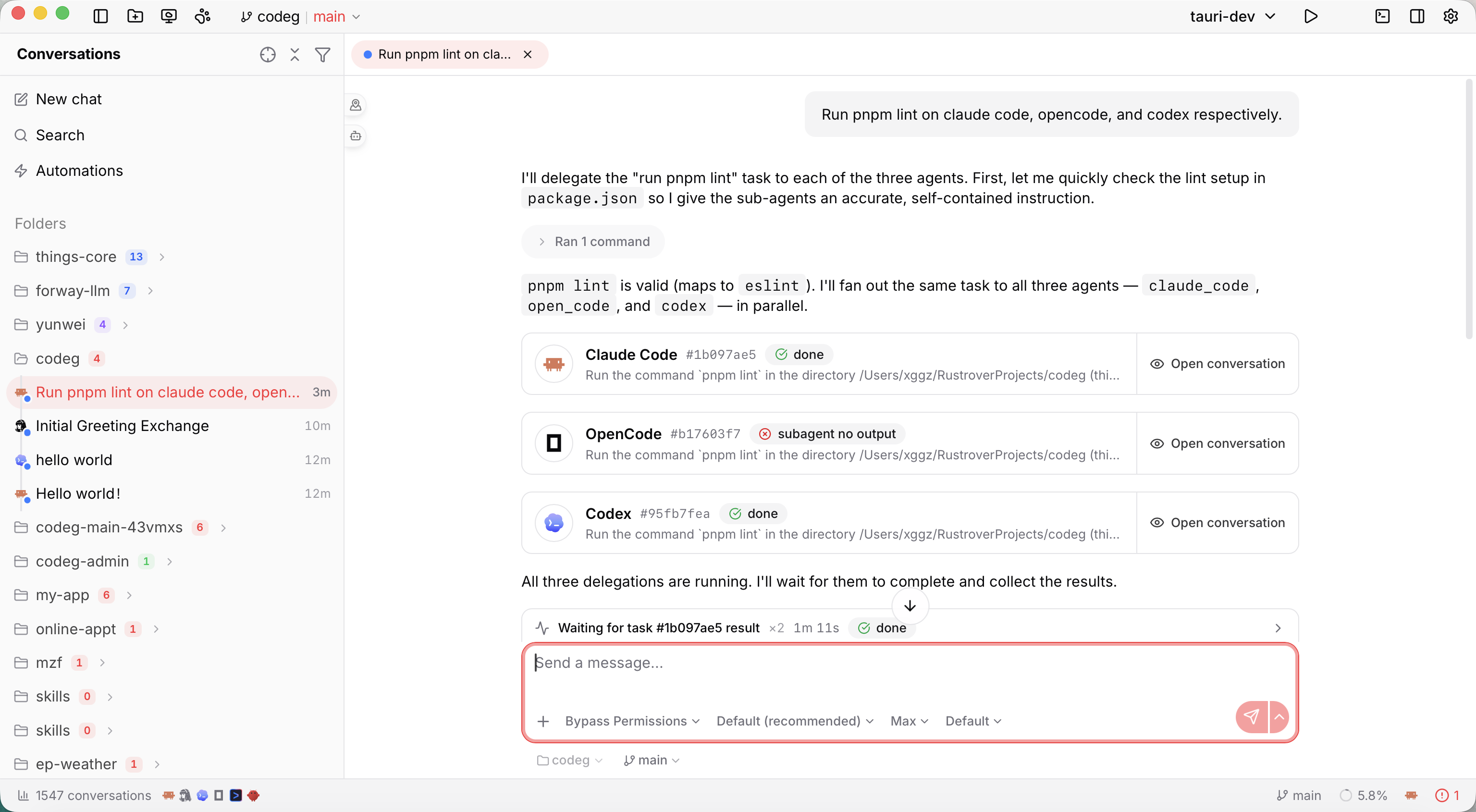
This is Codeg's headline feature. Inside a single conversation, the agent you're working with — the lead — can hand a self-contained sub-task to another agent and fold the result into its own answer. Claude Code can call Codex to write tests, ask Grok to update the docs, or spin up a second agent to review its own work — each sub-agent running as its own live session, in parallel, without you ever leaving the conversation.
Why bother? Two reasons. Strengths — every agent is good at different things, and delegation lets one task draw on several. Parallelism — independent pieces of work run at the same time instead of one after another; the lead fans them out and collects the results.
The fastest way to ask for it: type @ and pick an agent. That mention is read as an explicit instruction to delegate, which makes it the most reliable trigger there is — see Delegate with an @ mention.
How delegation works
When delegation is on, every capable agent gains one extra ability: it can start another agent on a sub-task. The flow is always the same:
- The lead delegates. It picks a target agent and writes a complete task description, then hands it off. It can issue several hand-offs at once.
- A sub-agent runs. Codeg starts a fresh session of that agent — its own conversation, in your working folder — and gives it the task.
- The lead collects the result. When the sub-agent finishes, the lead reads its answer back and carries on: summarizing, combining, or delegating again.
Two properties shape everything about how you use this.
A sub-agent starts cold. It can't see your conversation, your open files, or anything the lead knows — only the task text it's handed. So the lead has to pack everything the sub-agent needs into that task. (More on writing for that below.)
Hand-off doesn't block. Delegating returns a task handle immediately rather than parking the lead until the worker is done, so the lead can fire off several hand-offs back-to-back, do its own share of the work, and only then go collect the results. This is what makes genuine parallelism possible instead of a queue that merely looks concurrent — and it's the mechanism behind most of the patterns below.
Who can lead, who can work. The delegate ability reaches an agent as an extra tool, delivered through Codeg's built-in MCP server over ACP — so an agent can only lead if it accepts MCP tools over the protocol. Thirteen do, and can initiate delegation: Claude Code, Codex, Gemini, OpenCode, Cline, Hermes, CodeBuddy, Kimi Code, Grok, Cursor, DeepSeek Harness, Qoder, and Google Antigravity. OpenClaw and Pi don't — OpenClaw refuses MCP servers outright, and Pi quietly ignores them — so the delegate tool never reaches them and they can't lead. All fifteen can still be delegated to, which makes OpenClaw and Pi perfectly good workers. Whichever capable agent you're chatting with is the lead; there's no separate "orchestrator" to set up.
There's one way a capable agent loses the ability: the per-agent Let the agent handle files and commands switch withholds the delegation tools deliberately, since delegating would route the same work back through Codeg and out of the agent's own sandbox. The panel under Enable delegation names the agents that's currently true of, so a missing hand-off has a stated cause rather than reading as a silent failure.
Custom agents join in too. Any ACP agent you've registered yourself is a target like the built-ins — mentionable with @, spawnable as a worker, and given its own tab under Agent defaults. Whether it can lead follows the same rule as everyone else: it needs to accept MCP tools over the protocol.
Turn it on
Delegation ships off, so the first step is enabling it:
- Open Settings → Collaboration and find Multi-Agent Collaboration. (It sat under Settings → General before 0.31.2.)
- Switch on Enable delegation, then press Save. (With it off, the delegate tool simply isn't offered to any agent.)
It takes effect the next time an agent starts
The delegate tool is handed to an agent when Codeg launches it, and that tool set is fixed for as long as the agent stays connected. So a conversation that's currently connected won't gain the ability mid-flight.
It does not have to be an empty conversation, though. Any conversation picks delegation up the next time its agent starts — including one you've had for weeks, as soon as you come back to it after its connection ended (you restarted Codeg, or the status shows Disconnected). Only a live connection keeps serving the old tool set; if you'd rather not guess, a new conversation always has it.
(Turning delegation off is immediate: hand-offs are refused from that moment on, connected or not.) A mention that gets acknowledged in prose while no sub-agent ever appears is usually this.
Two neighbouring settings are worth knowing before you build a team:
- Maximum delegation depth — how many levels deep delegation can nest. The default is 1: the lead can delegate, but a sub-agent can't delegate further. Raise it (up to 8) only if you want sub-agents that build teams of their own — see Sub-teams.
- Agent defaults — per-agent overrides applied whenever Codeg spawns that agent as a worker, so delegated sessions start configured the way you want. Each agent gets its own tab — including any custom agent you've registered — holding a Mode row plus whatever options that agent advertises (Codex's approval policy and sandbox mode, for instance). The choices come from a live probe of the agent, so what you pick is exactly what it will accept. Leaving a row on Default (…) means inherit whatever the agent's own default is; picking the same value explicitly pins it, even if the agent later changes its default.
The full control surface — including the completed-result cache — is documented in Settings → Collaboration.
Workers have to be ready
A sub-agent is a real session of a real agent, so the target must be enabled, installed, and signed in — just like one you'd start yourself. Delegate to an agent that isn't ready and that hand-off comes back as spawn failed; the lead keeps going without it. Working with Agents and Authentication & Models cover getting each one ready.
The service, from the status bar
Delegation runs through a companion process, codeg-mcp, and since 0.30.4 the status bar says how that process is doing rather than leaving you to infer it from an agent that quietly can't delegate. The indicator reads:
| State | What it means |
|---|---|
| Running | The socket answers, the companion is on disk, and at least one tool group is on — so an agent launched here gets the tools, if it's one that accepts MCP at all |
| Not running | The broker socket isn't answering. Start service appears here when this runtime has a handle it can start with |
| No tools enabled | Every tool group is off, so an ordinary session gets no companion — a to-do run still gets its own reporting tools, which aren't switched here |
| Companion missing | The codeg-mcp binary isn't on disk |
| Unknown | The status couldn't be read at all |
Open it and the popover shows how many sessions and delegations are live and the depth cap, plus the last error if there was one. Hover the state badge for the socket address and the companion binary path.
It also carries the tool switches themselves — all nine: Delegation, Live feedback, Ask a question, Session lookup, Create automation, Create task, the two built-in-browser ones, and since 0.33.0 computer use, each with a one-line description, so turning a capability on doesn't mean a trip into Settings. These are the same switches as Settings → Collaboration — not a second copy of them — and flipping one here while that page is open makes the page converge on it rather than sending its stale value back on the next Save. Open settings, at the foot of the popover, goes straight to that page.
Delegate with an @ mention
You can always ask for delegation in plain prose, but naming the agent with an @ mention is the dependable way to get it. The mention is recognised as an explicit instruction to delegate that work to that agent — so a capable lead treats it as a decision you've already made, rather than a suggestion it might act on.
How to insert one. In the composer, type @. A picker opens with four groups — Files, Agents, Sessions, Commits — and typing filters across all of them. Type a few letters of an agent's name (or its internal slug, so claude_code finds Claude Code) and pick it from the Agents group. It lands in your message as a badge — and since 0.31.2 one Backspace takes it back off, rather than first eating the invisible space behind it.
What the lead receives. The badge travels as readable text — @Codex — with the agent's internal slug attached, which is what tells the lead exactly which agent to target rather than leaving it to guess from a display name. Because the readable name stays in the sentence, the mention doubles as ordinary prose:
@Codex write integration tests for the login flow in src/auth/login.ts.Some things worth knowing:
- One mention per agent, one sub-agent each. Name several agents in a single message and each one gets its own hand-off carrying its own slice of the work — the basis of fan-out.
- Say what the work is, next to the mention. A mention decides who; it doesn't decide what.
@Grokon its own gives the lead a target and nothing to send it. Keep the task in the same breath as the name. - Only enabled agents are mentionable — or reachable at all. An agent you've toggled off in Settings → Agents never appears in the picker, and since 0.22 it's also struck from the list of targets the lead is offered, so the lead can't pick it on its own initiative either. (An agent that's enabled but not installed or signed in can still be named — and comes back as spawn failed.)
- A mention is a strong instruction, not a hard route. Codeg puts the mention in front of the lead and tells it what a mention means; the lead is still the one that calls the tool. In practice a capable lead honours it consistently, but it isn't a mechanical guarantee — if a mention is ignored, the usual cause is delegation not being active in that session (see the warning above).
- The child runs inside Codeg, not off to one side. Until 0.30.0 a lead handed a mention often reached for its own sub-agent mechanism instead — Codex's native spawn, Claude Code's Task tool — even with
delegate_to_agentsitting right there in its tool list. The child then ran outside Codeg and never became a session you could open. The prompt now carries a block naming every agent your message links to, asking that any delegation of that work go throughdelegate_to_agentwith the matching agent type. Note what that block does not do: it binds the channel, not the decision. Nothing in it tells the lead to delegate at all — that's still the mention's job, and still the lead's call. - Mentioning the agent you're already talking to asks it to spawn a second, separate session of itself rather than just doing the work — occasionally useful for isolation, usually not what you want.
The same @ picker is how you reference files, past sessions, and commits — see the composer — and a session mention has a collaboration use of its own, covered under Pick up where another session left off.
Watch the team work
Delegation is visible the whole way through — never a black box:
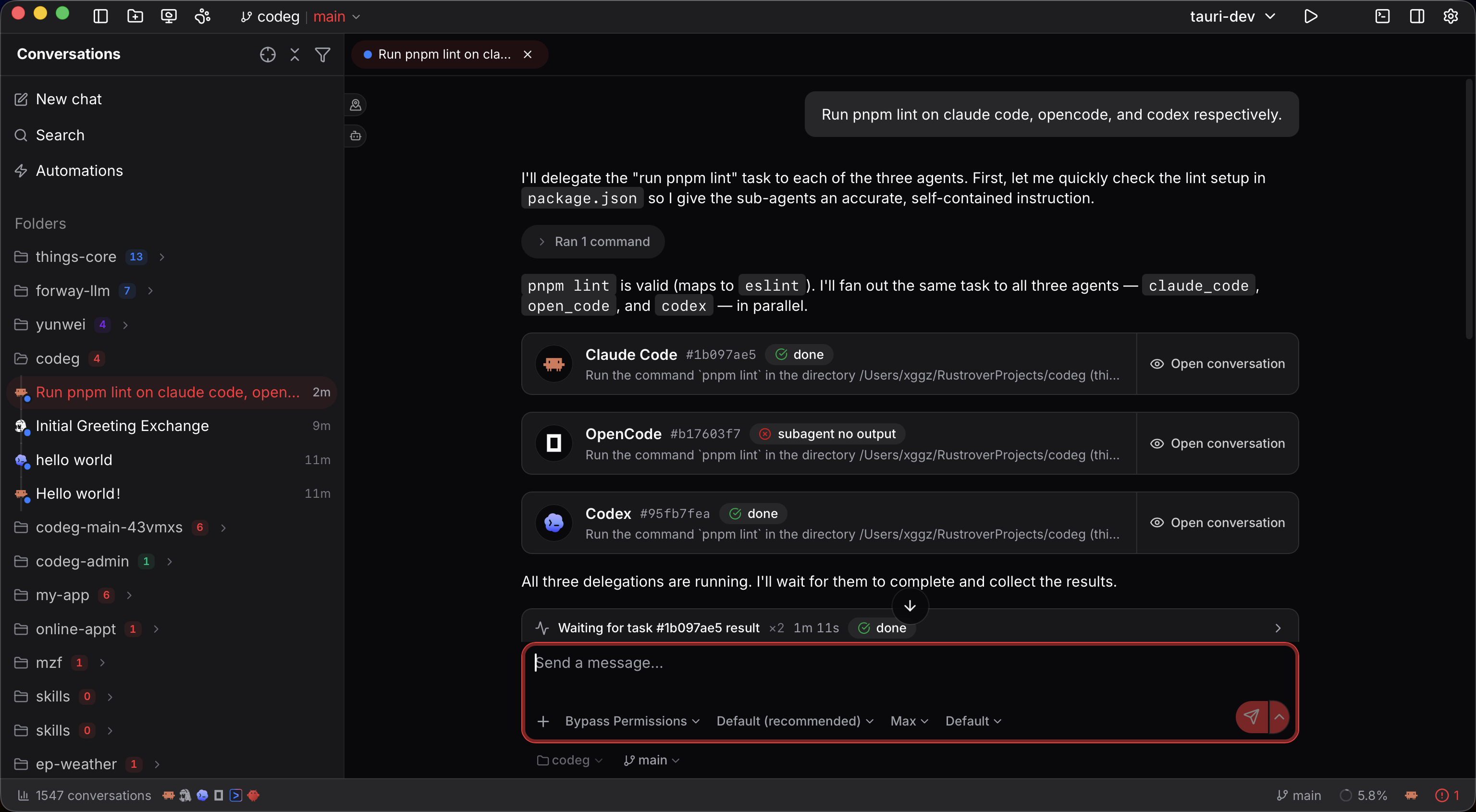
- In the lead's reply, each hand-off shows up as a delegating card — the target agent, the task, and a live status — in place of a raw tool call. The card is a status-and-navigation affordance: it doesn't print the worker's output inline, it points you at the session that has it.
- A Sub-agents panel collects the workers from the latest reply. Collapsed, it's a small Sub-agents 3 chip; expanded, each row shows the agent, its task, and a status badge that moves from running to done (or failed, with a reason like spawn failed or depth limit).
- Open any sub-agent to watch its full conversation stream live — the same transcript you'd see if you'd started it yourself. It's a viewer, not a second composer: you follow along, you don't drive its turns. Since 0.28 it opens as a side drawer rather than a centred dialog, with the lead's conversation still live behind it — so you're reading the worker while the lead carries on, which is the whole reason to open it. It also stacks: a sub-agent's transcript carries its own delegation cards, and opening one of those nests inside rather than burying what you were reading. And it no longer closes when the card that opened it scrolls out of view or you switch tabs. → Panels slide in beside your work
- An agent's own sub-agents show their work too. When Claude Code spins up its internal sub-agents (its own feature, not Codeg's delegation — see the note below), the capsule that used to just say Running… now carries a Live activity section streaming what that sub-agent is actually doing. It's live-only: once the capsule settles, it goes back to the finished summary and its stats.
- Grok's sub-agents, likewise. Grok forwards nothing a
spawn_subagentchild does over the protocol, so those used to be a genuine black box — a blocking spawn produced no output at all until it ended. Each child now gets its own Agent card that ticks along while it runs (tool calls, turns, context used), renders the child's report as the Markdown it is rather than as terminal output, and carries a View sub-agent session action that opens the child's own transcript read-only, live or after the fact — nested in the same stacking drawer as any other viewer. Those child sessions no longer show up as strays in the conversation list. Both live turns and reopened history get the same treatment. - Codex's team, too. Codex ships its own team-of-agents, and a native spawn raises no tool call Codeg could show — so a Codex sub-agent used to be invisible until you reopened the session. Each launch is now an Agent capsule named after the child's task, badged with its thread id, live and on reload alike. The capsule says on its face that it stands for the launch: Codex reports no further progress, and an async child keeps working after the capsule settles. In history those spawns used to read as half a kilobyte of base64 — Codex's hand-off is a sealed envelope only Codex can open, so it's dropped rather than printed, on that card and every other Codex tool card carrying one.
- CodeBuddy's, as well. A CodeBuddy sub-agent gets an Agent card with its tool calls nested inside, and since 0.34.0 (CodeBuddy 2.161.4) a call stays inside that card while its arguments are still being written, instead of slipping out of it.
- A running tool call looks running. A delegated sub-agent that's still working no longer wears a finished green check, and opening a viewer part-way through a turn picks up a delegation that's already in flight rather than missing it.
- You still hold the controls that matter. A sub-agent runs at your normal permission level for that agent, so when it wants to run a command or write a file, its permission prompt appears inside its view for you to allow or reject. Multiple-choice questions land there too. While a worker is waiting on you, its badge reads awaiting approval — the cue to open it, since nothing progresses until you answer.
A blocked worker comes and finds you
That badge used to be the only place a stuck sub-agent showed up — so an unattended run could sit blocked all afternoon with nothing anywhere saying so. A child waiting on a permission now reaches the desktop pet's badge, its panel and its Waiting pose, and the panel's permission card answers it directly; the row names the parent and jumps you there, since a child isn't openable as a tab. A to-do whose agent delegated says awaiting input rather than running, and an agent polling get_delegation_status is told the child is blocked on the user instead of waiting out the whole stall. → Issue #447
- When the lead checks on its team, you'll see it in the transcript as a compact status card with one row per task. Repeated checks on the same task collapse into that single card rather than stacking up.
Sub-agent conversations don't clutter your sidebar, but they aren't lost either: a conversation that spawned workers grows a chevron, and expanding it reveals its sub-conversations nested underneath — recursively, if a worker built a team of its own. That's how you find a worker's transcript hours later, long after the Sub-agents panel has moved on to a newer reply.
Want the whole team on one screen? Tile the sessions side by side — the lead in one pane, its sub-agents in the others — and watch every transcript at once. (The Infinite Canvas is for laying out root conversations; a sub-agent isn't a card there, though a lead's card badges how many it has.)
A sub-task that was cut off can be picked up
A delegated sub-task doesn't have to be written off because something interrupted it. Since 0.30.0 a lead can call resume_delegation on one that was canceled, or that died when a session or the app terminated unexpectedly. The child's recorded session is reloaded and continues in the same conversation, under its original id, so get_delegation_status and cancel_delegation keep working on the id the lead already holds — and it draws as one sub-agent card, live and after you reopen the conversation from history.
The scope is narrow on purpose, and enforced server-side rather than trusted to the lead:
- A task that is still running, or that already completed or failed on its own, is refused with not_resumable and its actual status. Resume revives interrupted work; it is not a retry. (That precise refusal depends on the outcome still being in memory — after a restart, an old task the broker no longer holds is reported as unknown rather than as failed. Either way it isn't resumed into a second run.)
- It takes no task text. There's an optional
reasonfor interruption context, and that's it — so it cannot quietly become a seconddelegate_to_agentwith different instructions. - A task belonging to someone else is refused outright.
For follow-up or genuinely new work, the lead delegates again as normal.
Write a good delegation prompt
Because a sub-agent starts cold, delegation rewards specific, self-contained requests. You're really writing two things at once: what you want overall, and enough detail that the lead can brief a stranger.
Good habits:
- Name the agent with
@. The clearest way to pin a piece of work to a particular agent — see above. Leave it out and the lead picks a target itself. - Say what's independent. If parts of the task don't depend on each other, tell the lead — "in parallel," "at the same time" — and it can fan them out instead of running them in sequence.
- Point at the real thing. Name files, paths, and the exact outcome. The lead passes these straight through to a sub-agent that can't see your screen.
- Say what you want back. "Return a list of the bugs you found, with file and line" gives the lead something it can actually fold into an answer; "review this" invites a wall of prose.
A prompt that kicks off a three-way split might read:
Refactor src/auth.ts to use the new token helper yourself.
In parallel, @Codex write integration tests for the login flow,
and @Grok update the auth section of the README.
When all three are done, summarize what changed.
The lead does the refactor, delegates the tests to Codex and the docs to Grok as two parallel sub-agents, waits for both, and gives you a single summary — while you watch all three in the Sub-agents panel.
Collaboration patterns
Delegation has no orchestrator to configure, so the shape of a collaboration is decided entirely by how you phrase the request. A handful of shapes cover almost everything worth doing:
| Pattern | Reach for it when | What it costs |
|---|---|---|
| Fan-out | The work splits into pieces that don't touch each other | N sessions running at once |
| Relay | Each stage needs the previous stage's output | No parallelism; slowest shape |
| Second opinion | Correctness matters more than speed | One extra session per review |
| Panel | A change is risky and can fail in several ways | One session per lens |
| Specialist | One slice of the task suits a different agent | One session |
| Split a surface | A sweeping change across many folders or modules | N sessions, plus write conflicts to manage |
| Sub-teams | The task decomposes twice over | Multiplies fast — raise the depth limit first |
| Session hand-off | The context you need lives in an earlier conversation | One session |
Fan-out: independent slices at once
The workhorse. Split work that doesn't overlap and let every piece run simultaneously — this is the shape that pays for the whole feature, because hand-off doesn't block the lead.
@Codex write integration tests for src/auth/login.ts.
@Grok update docs/auth.md to match the new token flow.
@OpenCode add the missing type annotations in src/auth/types.ts.
Report back with a one-line summary of each.
Give the lead a share of the work too, and it produces while its workers do. The one requirement is genuine independence: pieces that touch the same files belong in a relay or a worktree.
Relay: hand the result down a chain
When stage two needs what stage one produced — design, then implement, then test — ask for the stages in order and the lead will wait for each before starting the next.
First have @Grok read src/api/ and write a short migration plan
for moving to the v2 client. When it comes back, hand that plan to
@Codex to implement, then have @Claude Code review the diff.
The catch is the cold start: every worker in the chain is a stranger, so the lead has to carry the previous result forward into the next task rather than pointing at it. Worth saying so explicitly — "include the plan verbatim in the task you give Codex" — because a relay where stage two never received stage one's output is the most common way this shape disappoints. Nothing runs in parallel here, so use it only where the dependency is real.
Second opinion: build with one, review with another
Have the lead do the work, then delegate a review of it to a different agent. The cold start is the point: the reviewer never saw the reasoning that produced the change, so it can't be talked into it, and it re-derives the problem from the code instead of from a narrative.
Fix the race in src/queue/worker.ts.
When it passes, @Codex review the diff — the goal, the files I touched,
and what to look for: lost wakeups, double-processing, error paths.
Then address what's worth addressing and tell me what changed.
This is the tutorial below, and the pattern most worth bottling as a skill.
Panel: several reviewers, different lenses
For a change that could fail in more than one way, one reviewer is a single point of failure. Send the same diff to several agents with a different lens each — and lenses beat redundancy here, because three identical reviews mostly agree with each other.
I've finished the auth refactor. Send the diff to three reviewers in parallel,
each with a different focus:
@Codex — correctness and edge cases.
@Grok — security: token handling, timing, what leaks into logs.
@OpenCode — does the public API still read sensibly to a caller?
Then reconcile: what did more than one of them flag?
Ask for reconciliation explicitly. Without it you get three reviews to read yourself, which is most of the work you were delegating.
Specialist: keep your lead, borrow a strength
Stay in the conversation with the agent you like, and delegate the one slice that suits another better — a language it handles well, a gnarly refactor, a documentation pass. The lead keeps the context and the thread; the specialist gets a narrow, well-specified job.
Keep driving this refactor, but the Rust FFI shim in src-tauri/src/bridge.rs
is fiddly — @Codex handle just that file and report back what it changed.
Split a surface: one worker per folder
For a sweeping mechanical change, point each worker at a different folder or module. A hand-off can carry its own working directory, so workers don't all have to sit in the lead's folder.
Rename the `useSession` hook to `useConversation` across the app.
Split it by area and run them in parallel: one agent per top-level
folder under src/, each reporting the files it touched.
Two workers editing the same file will fight, and neither knows the other exists. Where slices might overlap, give each worker its own git worktree — separate checkouts of the same repo — and merge afterwards. A sub-agent does not get an isolated worktree automatically.
When the slices are big enough to want reviewing separately, To-dos is the better shape: one task per slice, each isolated by construction, each landing on its own once you've read it. Delegation is for work that folds back into one answer; tasks are for work that lands as several.
Sub-teams: let a worker build its own team
Raise Maximum delegation depth above 1 and a sub-agent can delegate in turn: the lead splits the work by area, and each area lead splits it again. Useful when a task genuinely decomposes twice — a migration across several services, each with its own code, tests, and docs.
Treat it as a deliberate choice. Every level multiplies the sessions in flight, and the tokens with them; each layer of hand-off is another cold start to write for, so instructions get more diluted the deeper they go. Depth 2 covers nearly every real case.
Pick up where another session left off
The context you need is often in a conversation you had yesterday. Mention it with @ — pick from the Sessions group — and the lead can read that session's title, agent, workspace, status, and recent messages, then act on what it finds, including delegating the follow-up.
Like an @agent mention, this is now read as an explicit instruction: naming a session means you're pointing at it, so the lead looks it up without being told to, once per session you mention.
@[yesterday's session] stalled on the migration halfway through.
Read what it got done, then have @Codex finish the remaining files.
This one needs Get session info switched on in Settings → Collaboration (it's on by default) — see the settings reference. It's read-only: the lead learns from the old session, it doesn't resume it.
When not to delegate
Delegation is the wrong tool for some work, and recognising that saves more time than any pattern above:
- Anything needing back-and-forth. A worker gets one task and returns one result; there's no second turn to clarify in. Work that needs iterating on belongs with your lead, or with you.
- Vaguely specified work. A stranger with a fuzzy brief produces fuzzy output. If you can't state the goal and the deliverable in a few lines, delegating just moves the ambiguity somewhere you can't see it.
- Small, fast edits. Spawning a session, cold-starting it, and reading a result back costs more than a two-line change is worth.
- Parallel edits to the same files. Use a relay, or one worktree each.
Turn a workflow into a skill
Delegation is driven entirely by how you prompt the lead — there's no orchestrator to configure, so a multi-agent workflow is really just a good set of instructions. Once you land on one you like, save it as a skill and invoke it with a single /command next time.
A skill is a small Markdown file (SKILL.md) with a name, a description, and a body of instructions the agent follows when you invoke it. A skill that encodes a cross-agent workflow simply tells the lead to delegate — for example, a build-with-review skill:
---
name: build-with-review
description: Implement a change, then have a different agent review it.
---

# Build With Cross-Agent Review

When the user invokes this skill:

1. Implement the requested change yourself.
2. When it works, **delegate a review to a different agent** — hand another
   agent (say Codex or Grok) the diff, the goal, and the files you touched,
   and ask it to hunt for bugs, missed edge cases, and unclear code. It can't
   see this conversation, so include everything it needs.
3. Read the review back, address what's worth addressing, and summarize both
   what you changed and what the reviewer flagged.
Author it under Settings → Skills, enable it for the lead agent — the one you'll invoke it on — and trigger it in the composer by typing / (or $ if the lead is Codex). The workers need nothing special; they just carry out the task the lead hands them. → Skills covers authoring and enabling in full.
Not the same as an agent's own sub-agents
Some agents ship their own sub-agent feature that spins up more copies of the same agent to parallelize work — and several ready-made skills, including a number in Codeg's built-in Experts pack, are written to drive that. Codeg's multi-agent collaboration is the different one: it delegates across agent types, one model calling another. A skill that talks about "subagents" but never names another agent is using the agent's own mechanism, not Codeg's delegation.
Tutorial: a reviewed feature, built by a team
Putting it together — a small feature, implemented by one agent and reviewed by another:
- Enable delegation. Settings → Collaboration → Multi-Agent Collaboration → Enable delegation → Save.
- Get both agents ready. Make sure your lead agent and the one you'll delegate the review to are each enabled and signed in — see Working with Agents.
- Start the session. Open a conversation with your lead agent in the project folder. Use a new one if the conversation you had in mind is already connected — that's the surest way to pick up the delegate tool you just enabled.
- Ask for the work and the review together. For example:text
Add a "Copy link" button to the share dialog in src/share/Dialog.tsx. When it works, @Codex review it: give it the diff, the goal, and the files you touched, and ask it to check for bugs and edge cases. Then address its feedback and tell me what changed. - Follow along. The review sub-agent appears in the Sub-agents panel as the lead finishes coding. Open it to watch Codex read the change, and approve any permission prompts it raises — the badge reads awaiting approval while it's blocked on you.
- Let it converge. The lead reads the review back, applies what's worth applying, and returns a finished, reviewed change.
- Review and commit. Check the diff in the Changes tab and commit when you're happy — the whole git workflow is right there.
Doing this a lot? Bottle step 4 as a skill (above) and it becomes a one-command workflow.
Good to know
@is the reliable trigger. Prose works, a mention works better — Codeg tells the lead that naming an agent is an instruction to delegate to it.- Enabling delegation reaches an agent the next time it starts. Not just blank conversations — any conversation gains it once its agent reconnects. Only a conversation that's connected right now keeps the old tool set, and that's the most common reason a mention seems to be ignored.
- One level deep by default. Raise Maximum delegation depth if you want sub-agents that delegate in turn.
- Sub-agents share your folder. A worker runs in the lead's working directory unless the lead gives it another — it doesn't get its own git worktree automatically. For true isolation, run parallel work in worktrees, as to-dos (where every task gets one), or as headless Automations.
- Each hand-off is one shot. A worker gets one task and returns one result; there's no resuming it for a follow-up. Ask again and you get a fresh session.
- Ending the turn doesn't stop the workers. If the lead wraps up while a sub-agent is still going, that sub-agent keeps running — open its session to see how it finished. Cancelling the lead does stop them: the cancel cascades to every worker it started.
- Results live in the worker's session. The lead keeps finished output in memory only while its own session is running. Once that ends, the full transcript is still there in the sub-agent's own conversation — reachable from the chevron on the parent conversation in the sidebar.
- Every sub-agent is a full session. It has its own token cost and its own transcript — delegation multiplies the work being done, and the usage along with it.
- OpenClaw and Pi are workers only. Neither accepts MCP tools over ACP — the way the delegate tool is delivered — so it can't reach them. Both are fine as workers, but can't lead.
- Your own agents count. A custom ACP agent is a first-class teammate — mention it, delegate to it, give it worker defaults.
Next steps
- Working with Agents — enable and sign in the agents you'll put on a team.
- Custom Agents — add an agent of your own to the roster you can delegate to.
- Settings → Collaboration — the delegation switches, depth limit, and per-agent worker defaults.
- Skills — bottle a delegation workflow into a reusable
/command. - Git & Worktrees — give parallel workers isolated checkouts so they don't collide.
- The Workspace — tile the lead and its sub-agents to watch them all at once.